
Download 青空文庫ローダー APK – Aozora Bunko, free books, Android reading app, text file reader, HTML reader, book downloader, Japanese literature, literary archive, public domain books, offline reading
Overview
青空文庫ローダー APK is an Android application designed to simplify access to a vast collection of public domain Japanese literature hosted by Aozora Bunko. Developed by arayan, the app serves as a curated gateway to thousands of digitized works, including classic and modern Japanese texts. Its primary purpose is to enable users to discover, browse, and download literary works in both TEXT and (X)HTML formats for offline reading. The software is particularly useful for readers interested in Japanese literature, students, researchers, and enthusiasts of public domain content.
The app provides multiple navigation methods, including searching by author or title, browsing newly published works since 2001, and viewing access rankings. These features help users identify popular or recently added works. A notable functionality is the ability to preview the beginning of a book before downloading, allowing users to assess content relevance without committing to a full download. The app also includes a direct shortcut to the Honya Mirai Kikin website, a supporting organization for Aozora Bunko’s operations.
While the app itself does not include a built-in text viewer for all formats, it supports internal reading of (X)HTML files. For TEXT files, users are advised to use a separate text viewer app. The developer recommends their own companion app, "読書家(青空文庫形式ファイルリーダー)," for optimal reading experience, though integration between the two remains pending. The app has been available since May 22, 2016, and continues to receive updates to maintain functionality and performance.
Key Features & Capabilities
- Access to Aozora Bunko Library – Provides direct access to a large archive of public domain Japanese literary works, including classics and contemporary texts.
- Search and Browse Tools – Users can search books by author name or title, browse newly published works from 2001 onward, and view current and past access rankings.
- Preview Functionality – Allows users to preview the beginning of a book before downloading, helping to evaluate content relevance and avoid unnecessary downloads.
- Download Management – Books can be downloaded and accessed later via a dedicated "Downloaded" section, enabling offline reading.
- Internal (X)HTML Viewer – Supports direct reading of (X)HTML formatted files without requiring an external app.
- Integration with Support Organization – Includes a shortcut to the Honya Mirai Kikin website, promoting awareness and support for Aozora Bunko’s mission.
- Companion App Recommendation – The developer suggests using "読書家(青空文庫形式ファイルリーダー)" for reading TEXT files, indicating a planned future integration.
These capabilities make the app ideal for readers who value accessibility, organization, and offline reading. The ability to preview content before downloading enhances user efficiency, especially when managing storage on mobile devices. The inclusion of ranking data and chronological browsing helps users discover trending or historically significant works. While the app does not include full text viewing for all formats, its modular design encourages users to combine it with complementary tools, supporting a flexible reading workflow.
User Interface, Workflow & Performance
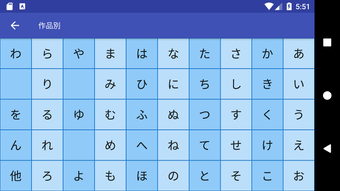
The user interface of 青空文庫ローダー APK is designed with simplicity and functionality in mind. Navigation is structured around core actions: searching, browsing, and accessing downloaded content. The main screen likely features categorized sections such as "Newly Published," "Top Ranked," and "Downloaded," allowing users to quickly locate desired materials. Input fields for author and title searches are straightforward, and results are displayed in a clean list format.
Workflow efficiency is enhanced by the preview feature, which reduces the need for full downloads during initial exploration. The "Downloaded" button provides immediate access to saved files, streamlining the reading process. The internal (X)HTML viewer offers a seamless experience for those who prefer this format, though TEXT file reading requires an external application.
Performance observations are based on general software behavior patterns. The app’s lightweight design, with a file size of 2.8 MB, suggests minimal impact on device resources. The developer did not specify resource usage details. Stability is expected to be consistent given the app’s long-standing presence and regular updates. No performance benchmarks or user-reported issues were provided.
Compatibility & System Requirements
青空文庫ローダー APK is designed for Android devices and is compatible with the Android operating system. The current version is 1.2.2, released on May 22, 2016. The application has a file size of 2.8 MB, indicating a lightweight installation that should fit on most modern Android devices.
Exact system requirements were not listed. The developer did not provide information on minimum Android version, CPU, RAM, or storage needs. Compatibility with older or newer Android versions remains unspecified. Users should ensure their device supports APK installation and has sufficient storage for downloaded books. The app does not require a subscription or in-app purchases, and all functionality is available in the free version.
Pros and Cons
Pros
- Free to download and use with no in-app purchases
- Lightweight design at only 2.8 MB
- Supports previewing books before downloading
- Offers internal (X)HTML reading capability
- Provides access to a large public domain literary archive
- Regular updates maintain functionality and compatibility
- Includes a shortcut to support the Aozora Bunko foundation
Cons
- No built-in text viewer for TEXT files (requires external app)
- Internal (X)HTML viewer may not support all formatting
- Exact system requirements and compatibility details not provided
- Future integration with companion app is not yet available
- Limited to Aozora Bunko content; no support for other literary archives
FAQ Section
Is 青空文庫ローダー APK free to use?
Yes, the app is completely free to download and use. There are no subscription fees, in-app purchases, or hidden costs.
What file formats does the app support?
The app supports (X)HTML files for internal viewing. TEXT files are downloadable but require a separate text viewer app for reading.
Can I read books offline?
Yes, once a book is downloaded, it can be accessed offline through the "Downloaded" section of the app.
Is the app compatible with all Android devices?
Compatibility information was partially provided. The app runs on Android, but exact minimum system requirements were not specified.
Does the app require internet access?
Internet access is required for searching, browsing, and downloading books. However, once downloaded, books can be read offline.
Final Thoughts
青空文庫ローダー APK stands out as a focused and efficient tool for accessing public domain Japanese literature on Android devices. Its clean interface, smart preview function, and support for multiple formats make it a practical choice for readers seeking convenience and reliability. While it relies on external tools for full functionality, the developer’s clear recommendations and planned integrations signal ongoing development.
For students, researchers, and Japanese literature enthusiasts, this app offers a valuable bridge to a rich literary archive. Its lightweight nature and free access ensure broad usability across a wide range of devices. Despite minor limitations in format support and missing system details, the app delivers on its core promise: easy, organized access to timeless works.
Download 青空文庫ローダー APK now





.png)

